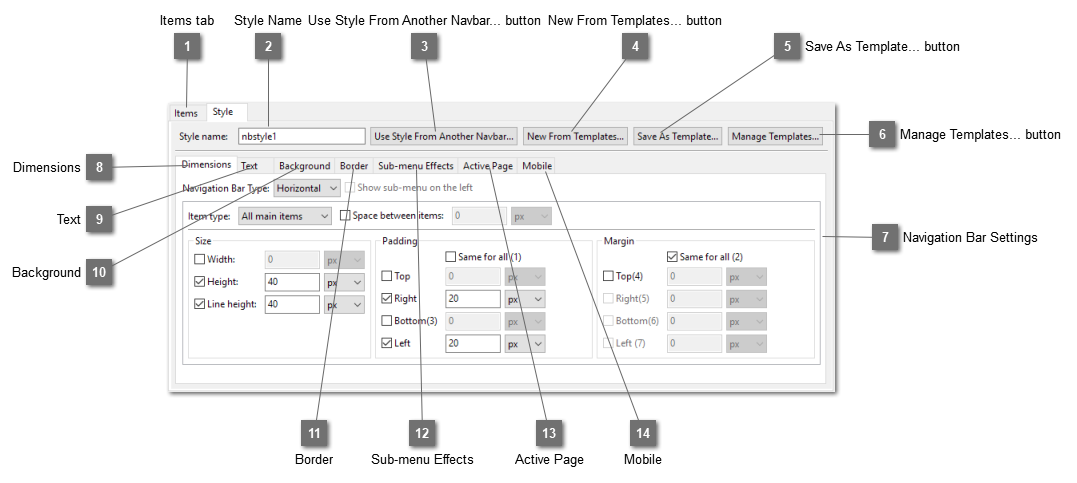
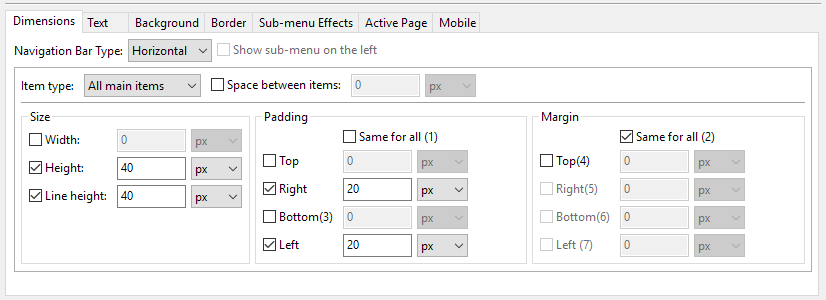
The Style tab allows you customize the navigation bar styles. Please note that not all settings can be used together and not all combinations are possible.
 Items tab
|
|
 Style Name
The name of the style of the navigation bar.
|
|
 Use Style From Another Navbar... button
Open the Navigation Bar Style Dialog and select the style of another navigation bars previously created in this website. Normally this will be used with secondary navigation bars. Each navigation bar share the same look but the menu items of each bar are different.

|
|
 New From Templates... button
|
|
 Save As Template... button
Save this navigation bar as template. A dialog will be opened for you to enter the template name.
|
|
 Manage Templates... button
|
|
 Navigation Bar Settings
Change the style settings of the navigation bar
|
|
 Dimensions
|
|
 Text
|
|
 Background
|
|
 Border
|
|
 Sub-menu Effects
|
|
 Active Page
|
|