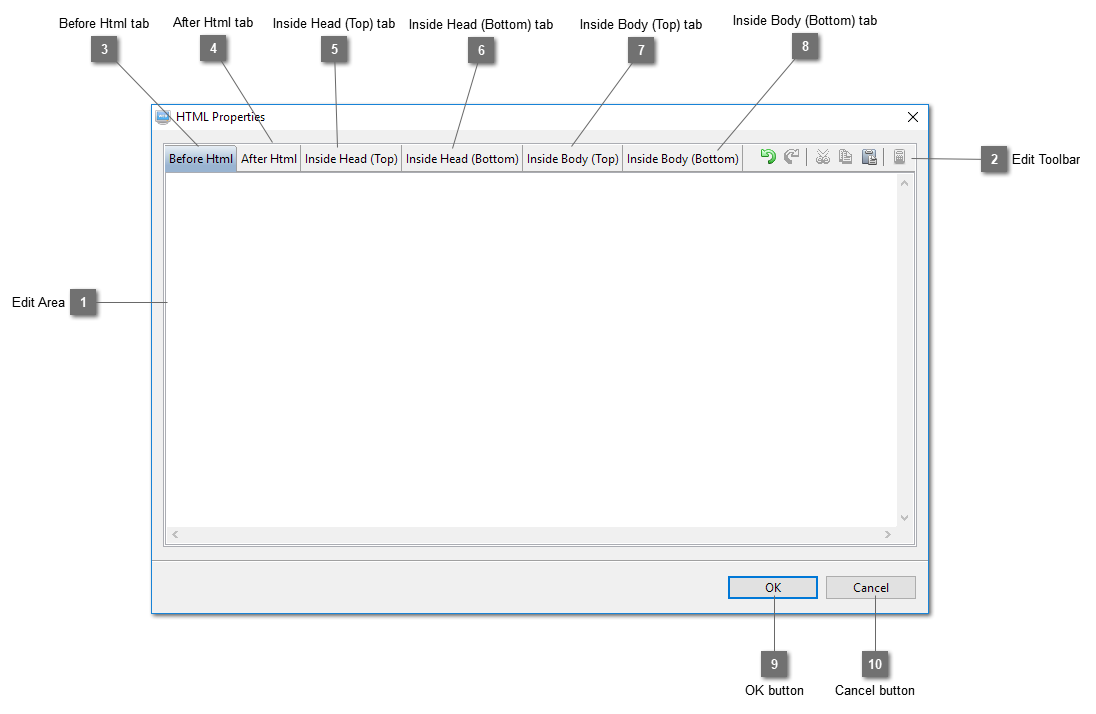
Edit AreaEnter code or HTML here to be inserted into the page.
|
|
 Edit ToolbarPerform undo, redo, cut, copy and paste to the HTML or code in the edit area.
|
|
 Before Html tabSelect this tab to insert code to this location within the page.
<Before Html is inserted here>
<html>
<head>
</head>
<body>
</body>
</html>
|
|
 After Html tabSelect this tab to insert code to this location within the page.
<html>
<head>
</head>
<body>
</body>
</html>
<After Html is inserted here>
|
|
 Inside Head (Top) tabInsert html or code at this location on a page.
<html>
<head>
<Inside Head (Top) is inserted here>
<generated contents>
</head>
<body>
</body>
</html>
|
|
 Inside Head (Bottom) tabInsert html or code at this location on a page.
<html>
<head>
<generated contents>
<Inside Head (Bottom) is inserted here>
</head>
<body>
</body>
</html>
|
|
 Inside Body (Top) tabInsert html or code at this location on a page.
<html>
<head>
</head>
<body>
<Inside Body (Top) is inserted here>
<generated contents>
</body>
</html>
|
|
 Inside Body (Bottom) tabInsert html or code at this location on a page.
<html>
<head>
</head>
<body>
<generated contents>
<Inside Body (Bottom) is inserted here>
</body>
</html>
|
|
 OK buttonClick OK to save the contents.
|
|
 Cancel buttonClose this dialog and discard all the changes made.
|
|