|
|
Real Media Properties Dialog
 Location
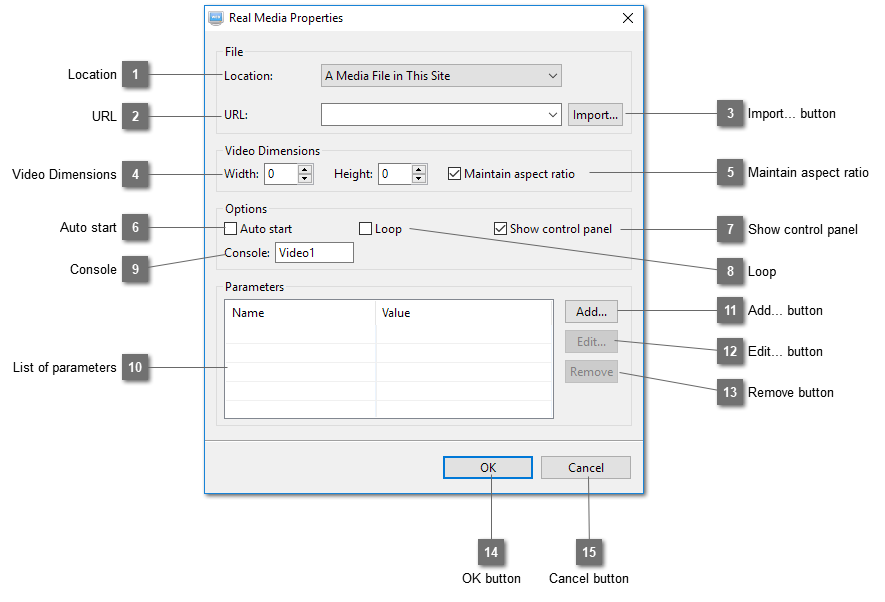
Select the location of the Real Media file.
| |
 URL
Select the Real Media file to be played.
| |
 Import... button
Import an external Real Media file to the website.
| |
 Video Dimensions
Show the dimensions of the Real Media file which are obtained from the file. If the size detected is over 750x750, the width and the height will be adjusted to fit in this size.
| |
 Maintain aspect ratio
Maintain the ratio between width and height when resizing.
| |
 Auto start
Select this option to play the Real Media file automatically after the page is loaded.
| |
 Show control panel
Select this option to show the control panel of the Real Media Player.
| |
 Loop
Select this option to play the Real Media file repeatedly.
| |
 Console
Enter the name of the console. This name is used to relate the Display and the control panel of the Real Media Player. Unlike other media player, the display and the control panel are separated. This name must be unique on the same page. If you insert two Real Media files on the same page, use different names for the Console such as "Video1" for the first file and "Video2" for the second.

| |
 List of parameters
Show a list of parameters that have been added.
| |
 Add... button
Add a new parameter.
| |
 Edit... button
Edit the selected parameter.
| |
 Remove button
Remove the selected parameter.
| |
 OK button
Click OK to save the settings.
| |
 Cancel button
Cancel saving the settings.
| |
|
|